Linked Accounts
Updates to our service
Important information - Please remember that the value of investments, and any income from them, can fall as well as rise so you could get back less than you invest. If you are unsure of the suitability of your investment, please seek financial advice. Tax rules can change, and benefits depend on individual circumstances.
What are linked accounts?
With our linked accounts feature, you can view and manage your family's HL accounts from your own login. This works on the website and on the HL app.
There are two access options:
'View only access' - you’ll be able to see the same information and use some of the same functions as you can with your own account.
'Trade access' - you can also place deals on their behalf.
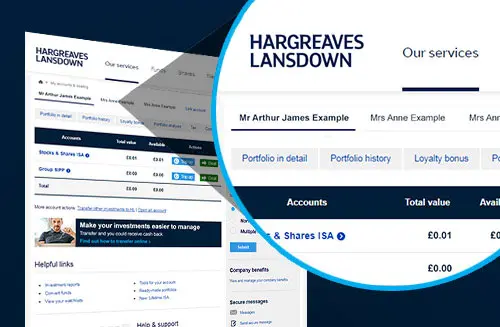
The account holder will still need to log in themselves for some functions. For example, you will not be able to add cash, request withdrawals or amend their personal details.
When you link accounts with someone, it does not mean that they are automatically linked to your account.
What type of accounts can I link from and to?
You can link your own individual account to another individual, such as a family member of close friend, or to a second account in your name or a joint HL Account (including joint investment accounts, investment clubs, charities, or company investment accounts).
If you are linking to a child’s account, including a bare trust (where you’re not the registered contact), a legal entity account, or investment club (where you’re not a member of the investment club), you can only have access to view these accounts but not place trades.
Other account types other than those in your individual name should not set up linked accounts.
You can view a full list of eligible links below:
| Authorised Third Party (A3P)(Primary) | Account Holder (Secondary) | Eligible Link(s) |
|---|---|---|
| Individual | - Individual - Joint - Junior (where A3P is Reg. Contact) - Bare Trust (where A3P is Trustee) - Investment Club (where A3P is Member) | Trade or View Only |
| Individual | - Junior (where A3P is not Reg. Contact) - Bare Trust (where A3P is not Trustee) - Legal Entity - Investment Club (where A3P is not Member) | View Only |
| Junior | - Bare Trust (for same child) | View Only |
| Bare Trust | - Junior (for same child) | View Only |
Where a link does not show in the table above, it will not be possible for linked accounts to be set up, or continue to be in place.
FAQs
The linked accounts service isn’t designed for other parties, such as financial advisers, junior accounts, joint accounts, or accounts held in the name of other legal entities (such as companies or trusts) to have access to view or trade on another’s account. We’d therefore request that you remove this link through your online account. The process is simple and only takes two minutes.
You can remove a link online at any time. This can be done either by the Account Holder or the Authorised Third Party.
To remove or change a link, log into your account, and go to the ‘Account settings’ page. Select ‘Linked accounts and third parties’ from the left-hand menu. You can then choose the link which you wish to delete.
We do not allow other parties, such as financial advisers to have access to view, trade or make changes to your account.
If you want to put a more formal arrangement in place you might want to consider a Power of Attorney. This is a legal document that allows you to appoint someone you trust to make decisions and manage your affairs on your behalf.
Learn more about Power of Attorney
We can also work with you to make sure you have the help you need. This can include support with unexpected life events, accessibility needs, mental or physical health, addictions, abuse, or financial difficulties.
I have further questions
If you have any more help or have additional questions on our linked accounts service, then please don’t hesitate to get in touch.